Telemetry Is Only as Good as Your Ability to Use It
Continuous monitoring is the heartbeat of proactive threat detection. It’s what shrinks the time between “something’s wrong” and “it’s contained.” But continuous monitoring runs on telemetry, and telemetry is only as good as your ability to understand it: what it covers, what it means, and where it lives.
That’s harder than it sounds. I work security at an organization that processes tens of trillions of signals a day across hundreds of services, and even with all that data, the hardest question in an active investigation is often the simplest to ask: which telemetry actually helps me close this gap right now?
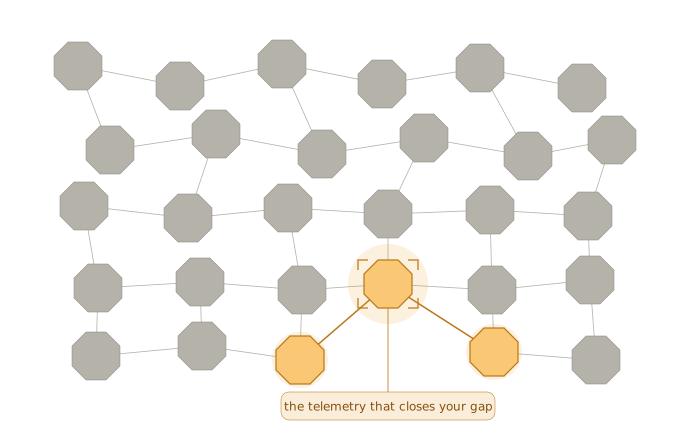
In practice, that one question fans out into a dozen:
- Do we even have coverage for this type of activity?
- Is this snapshot inventory data, or live service activity?
- What does this telemetry actually mean?
- Which other tables correlate to this one?
- Activities A, B, and C happened. We’ve got telemetry for A and B, so where’s C?
- Is there a parity gap we need to fix?
- And can I trust this source? How authoritative is it?
When you’re racing the clock, hunting for these answers is the last thing you want to be doing.
In this post, I’ll walk through one way to systematically build an AI chatbot that answers these questions for you, so your team spends less time finding telemetry and more time using it.
Before We Build
Early in my career I learned the MVP (Minimum Viable Product) playbook. Lately I’ve fallen for its modern cousin, SLC (Simple, Lovable, Complete). The appeal? You can validate an idea by yourself, fast, with no committee. Prove it’s useful first; then partner with other teams to harden it into something formal once the impact speaks for itself.
The goals guiding this build:
- Simplicity: quick and reliable to build. You’re (probably) not an engineer shipping an enterprise platform, so don’t build like one.
- Accessibility: anyone on the team should be able to use it. That’s what turns a personal tool into a force multiplier.
- Efficiency: reuse vetted pieces of your stack. Less attack surface, less auditing, less overhead.
- Scalable & repeatable: it should hold up as telemetry grows into the thousands, and work for the next source or team without a rebuild.
The problems we’re solving:
- Nobody knows every telemetry source. You know your handful of core sources cold, but intimately understanding every one of thousands isn’t realistic, especially as signals are added and retired all the time.
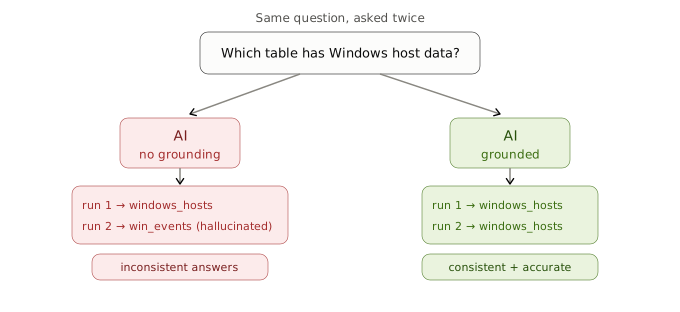
- AI is powerful, but flawed. It hallucinates. Confidently. And ask it the same question twice, you might get two different answers. The fix: anchor it with authoritative grounding data so answers stay accurate and consistent.
The setup. You’re in a security role at a large org, with:
- Telemetry across tens of thousands of databases and tables
- Querying available via API
- A RAG orchestration framework (Azure AI Foundry, Vertex AI, Amazon Bedrock, etc.)
The Build
Step 1: Mapping the Schema
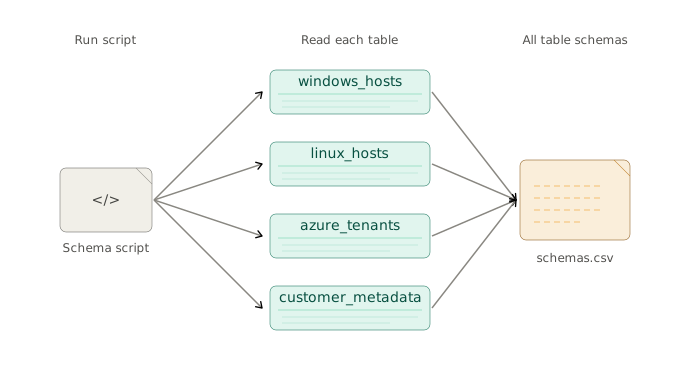
No experienced hiker walks into the backcountry without first studying the map: where the trailheads are, which way the switchbacks run, where water sources sit, what the elevation profile looks like. In data, understanding the schema is the same first act: knowing which fields exist, how they relate, and which ones might carry the signal of interest.
🔧 Technical Solution
Develop a script that queries every telemetry table to extract its individual schema.
Step 2: Characterizing the Data Source
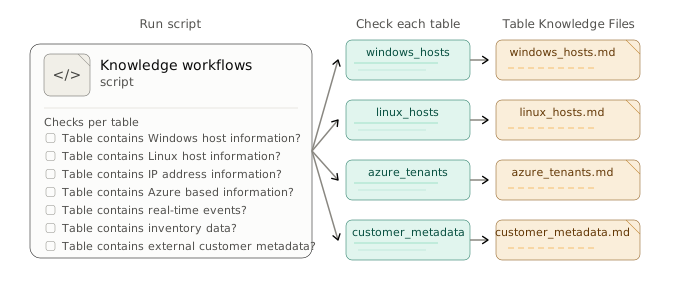
A map shows the trail; walking it teaches what’s actually there. Characterizing your data is that boots-on-ground recon: knowing what lives in each table, so when a case sends you searching, you already know where to look.
🔧 Technical Solution
Develop another script that queries every table with knowledge workflows tuned to the analytical questions your job normally asks.
Step 3: Documenting Your Findings
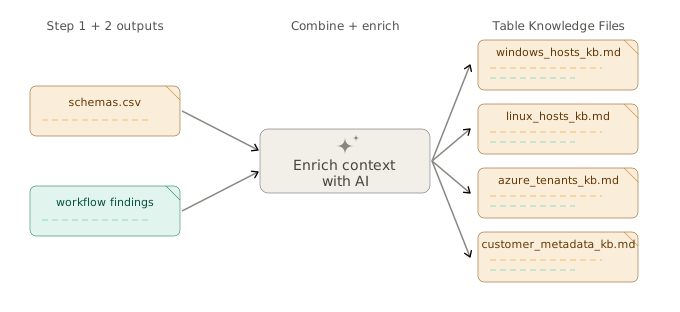
Documenting your findings is the field journal: capturing what each source holds, so the next investigation starts from your curated knowledge base, not from scratch.
🔧 Technical Solution
Combine the outputs from Steps 1 and 2 and generate a markdown file for each table.
Step 4: Grounding the AI
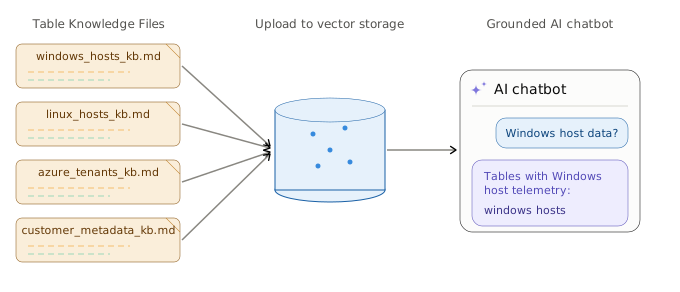
Finally, your map, recon, and journals get handed to a guide who has read them all, and that guide helps every hiker find the right trail. Grounding an AI chatbot in your schema, recon, and notes creates that guide: anyone on the team can ask where the relevant telemetry lives and get pointed down the right path for their active investigation.
🔧 Technical Solution
Upload all the table markdown files to a vector store for an AI chatbot to use as grounded data.
Stop Hunting, Start Asking
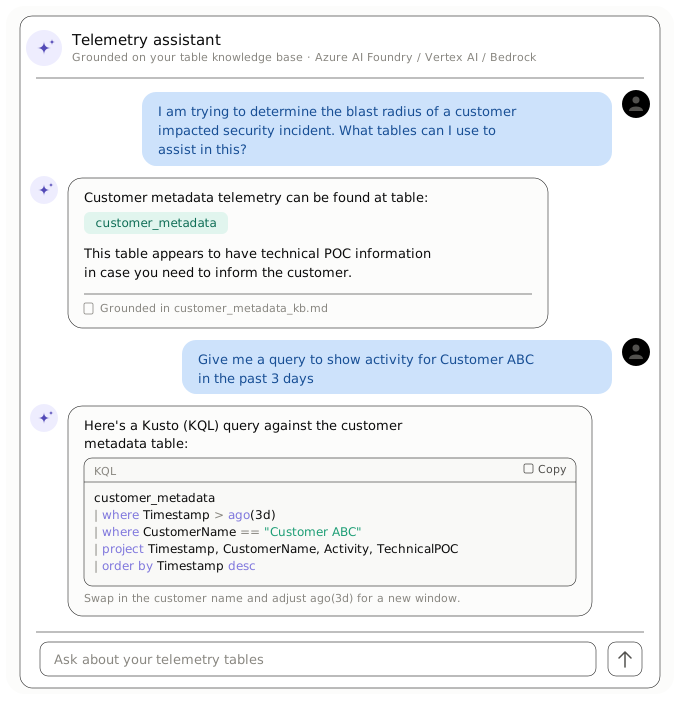
The end product is simple enough for anyone on the team to use. This is a generalized example, of course, but hopefully it sparks ideas for adapting it to your own use case. You can even expose the raw markdown files to your more technical peers, who might prefer them over the chatbot.
Either way, one thing’s certain: AI manages and processes context far better than any single person ever could.
Did you know?
If SQL (structured tables and joins), NoSQL (effortless JSON), and Elasticsearch (blazing speed) somehow had a baby, they'd name it KQL, or Kusto Query Language. KQL is the language for Kusto (Azure Data Explorer), a highly optimized columnar store that ingests straight from common data pipelines like Logstash.