Early in my career I built a home lab to learn what I didn’t know. It got out of hand fast: my own 2FA identity provider behind a reverse proxy, an Active Directory domain, Kubernetes clusters, and a stack of services I had no real use for. All of it added management overhead and attack surface. All of it taught me a lot.
What I run now is smaller and built on purpose. It will keep changing, but this is where it sits today, at the balance of risk and convenience that fits how I actually live.
Design Principles
- Assume breach and least privilege
- Layered defense
- High-fidelity alerting
- Effective end-to-end network analysis
- Privacy first
- User convenience
Guest Network
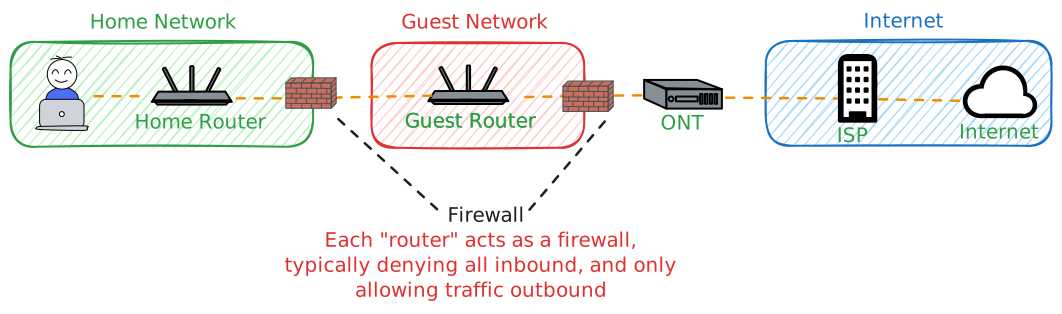
Guests get their own Wi-Fi, kept well away from my tinkering. It runs on a dedicated router outside the main network, connected straight to the ISP’s optical network terminal (ONT). It doubles as a quick way to tell whether the ISP is down or whether I broke something myself.
It is an ordinary off-the-shelf router, not the ISP’s. Even if you never build a network like this one, replacing the ISP-provided router is worth doing. If they will not allow it, most will put their device in bridge mode so yours can sit behind it.
The reason is that ISPs usually keep remote access to their own equipment, which puts them one hop from everything you own. Your own router puts a firewall between them and your devices. CISA reports PRC state-sponsored actors have targeted telecom and ISP networks globally since at least 2021.1 None of that helps, of course, unless you lock down your router too.
Home Network
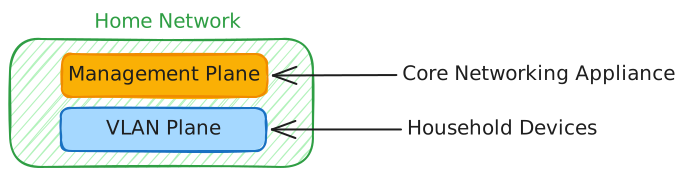
Within the home network, I split things into two main layers. The first is the management plane - the core networking gear that all traffic passes through. The second is the VLAN layer, which gives me fine‑grained segmentation for the many devices in the house.
Management Plane
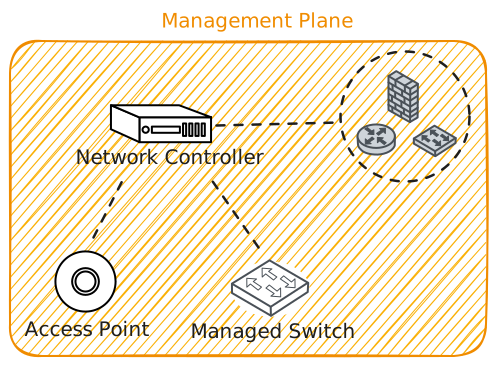
At the center is what I call the network controller: a firewall, router, and switch combo that manages the VLANs, routes between them, and pushes firmware to my switches and access points.
Everything flows through it. Device to device, device to internet, east-west or north-south, it all crosses the controller. That makes port mirroring and deep packet inspection trivial to set up, and it means I have end-to-end visibility into every household device with no telemetry gaps.
It is also the highest-value target in the house. Anyone who owns it can poison DNS, machine-in-the-middle unencrypted protocols, and reach services that were never exposed. Appliances like this get little EDR coverage, so detection is weaker than on a laptop. Only two devices can reach the management network and the controller’s web interface, which is the most practical way in.
All DNS is forced through the controller, which enforces DNS-over-HTTPS to Cloudflare via Pi-hole. That limits DNS exfiltration, makes any device using another resolver stand out, and blocks ads network-wide, which are a malware vector in their own right.
I also geo-IP block entire countries. Nothing in the house has a legitimate reason to reach them, and if an edge case comes up I tether to my phone. It forces an attacker to land at least part of their infrastructure somewhere I allow.
A hypervisor runs on the management plane, hosting the VMs behind my home SOC. Each is pinned to its VLAN and none can initiate back to the management plane, though the controller can push logs to them.
There is more I have done here, but that is the shape of it.
Virtual Local Area Networks (VLANs) Plane
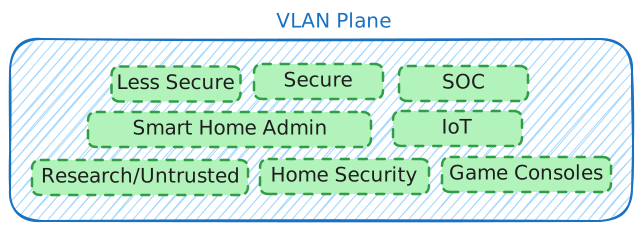
Finally, the VLANs that make up most of the network. Same principle: if traffic between two VLANs makes no sense, it is blocked, and where only one direction makes sense, only that direction is allowed. Fine-grained rules mean anything outside them is highly anomalous, which is exactly what you want for high-fidelity alerting.
-
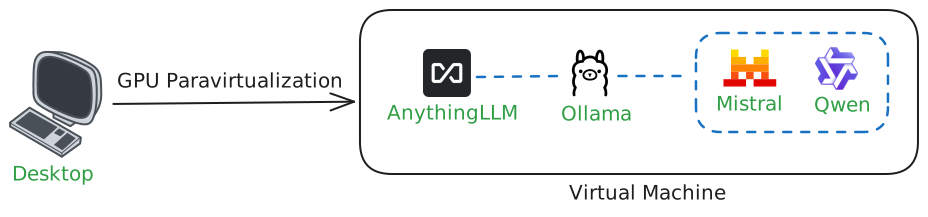
Less Secure Devices - everyday machines: desktops, tablets, and phones for browsing, mail, and social. The desktop is the exception. It has the VRAM to run local LLMs, which I use for security research that cloud models often refuse. Anything I analyze from questionable sources runs inside a VM, using GPU paravirtualization to share the card.
-
Secure Devices - one admin-only machine, kept clean, and the only device allowed to reach the management plane directly.
-
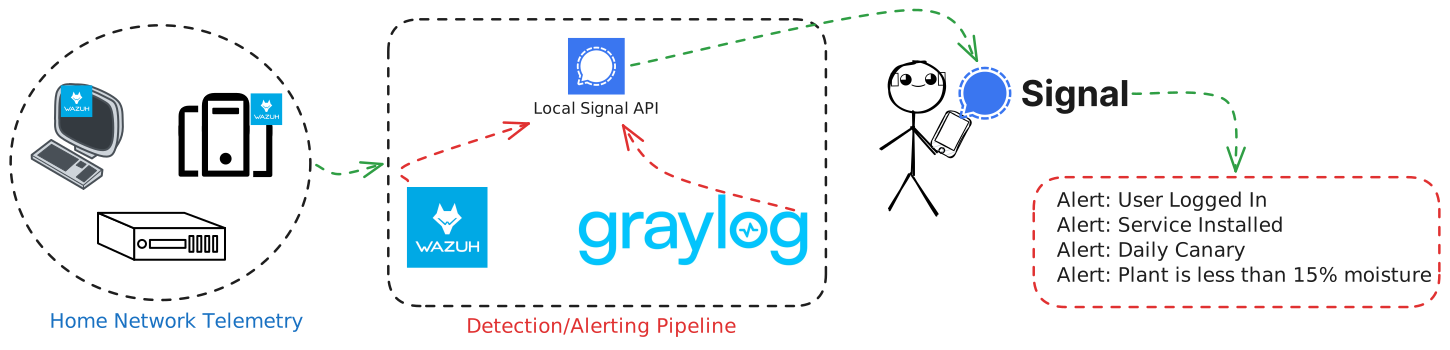
SOC - the detection stack. Graylog ingests logs from the controller and other sources, Wazuh agents report from endpoints, and a local Signal API pushes alerts to my phone. I only alert on genuinely anomalous or high-value events. Alert fatigue is what kills a one-person SOC.
-
Smart Home Admin - Hubitat, Philips Hue, and Lutron. Fully offline, stable, and low-latency over Zigbee and Z-Wave, which is why the automations I actually rely on, like lighting that tracks my circadian rhythm, have kept working for years.
-
IoT - TVs, printers, smart lights, the washing machine. Most cannot initiate connections to other VLANs because nothing they do requires it. Their telemetry can be a useful defensive signal in its own right.
-
Research/Untrusted - where a VM goes when I want it cut off from the internet and everything else, usually to analyze a sketchy binary. Advanced malware could still escape a VM; at that point, fair play. I just hope I capture the exploit on the way out.
-
Game Consoles - online gaming carries odd risks even with UPnP disabled. Case in point: a remote code execution exploit against online players of Animal Crossing: New Leaf on the 3DS.2
Summary
To be clear, this home network is overkill. It is also fun. What started as a small lab for learning fundamentals turned into something that would hit four nines of availability if my ISP and power were commercial grade. The detours taught me more than the plan did, and the whole thing has made me better at every job since.
If you are early in your security career, build a lab and experiment, even if it’s outside your domain. That matters most when your day job is not stretching you. The stack keeps changing, your personal technical debt grows with it, and continuous learning is the only way to stay ahead. This is the way of security.
-
Cybersecurity and Infrastructure Security Agency (CISA), “Countering Chinese State-Sponsored Actors Compromise of Networks Worldwide to Feed Global Espionage System,” Alert AA25-239A, last revised September 3, 2025. https://www.cisa.gov/news-events/cybersecurity-advisories/aa25-239a ↩︎
-
YouTube video, accessed March 1, 2026. https://www.youtube.com/watch?v=pV0xnIsgGXE ↩︎